Claude Code Memory System: MEMORY.md, Topic Files, and Automated Maintenance
In shortClaude Code silently truncates MEMORY.md past line 200, and mine had grown to 501 lines, so about 60 percent of my accumulated lessons were invisible for days before I noticed. Most of the 8 design rules came out of that. The system is plain markdown across 34 projects, with one command to read and one to write, plus five cron jobs handling rotation and a daily index diff. Twenty-two days in, I have not re-explained project state once.
When I type /project ilp-website, Claude loads the project state from my last session, the lessons it learned about WordPress publishing quirks, the SEO decisions we made last week, and the open threads from yesterday’s daily log. It takes about four seconds.
When it makes a mistake, the mistake becomes a permanent lesson. Next session, it doesn’t make it again. When I say “flush,” it captures everything we did, every decision, every open thread, and writes it to three locations before I close the terminal. When I come back tomorrow, or next week, the context is there.
Claude Code ships with most of the primitives: MEMORY.md auto-loading, CLAUDE.md injection, slash commands, a plans directory. What it doesn’t ship is the lifecycle layer that turns those primitives into persistent memory: the session commands that persist state, the rotation crons that prevent overflow, the drift detection that catches silent corruption, and the 8 design rules that keep the whole thing from rotting.
I’ve been running this for 22 days across 34 projects. Here’s what it does:
- Context survives. Claude picks up exactly where the last session ended, across all 34 projects. I haven’t re-explained project state once.
- Mistakes stick. 130+ condensed lessons across 10 domain files. Wrong Docker command, wrong API parameter, wrong voice pattern in a draft: it becomes a lesson by session end.
- The system audits itself. Two parallel audit passes found 13 issues by reading the system’s own documentation. It detects and corrects its own drift.
- Fully autonomous. Once built, the whole thing runs without human involvement. You use your tools, say “flush” at the end, and the memory manages itself.
I run a publicly traded cybersecurity company and manage 34 active projects across corporate strategy, AI infrastructure, and content. This system is how I keep all of them in context without maintaining it manually.
Here’s the full architecture, the 8 rules I derived from breaking it, and the cron jobs that keep it honest.
Part 1: The 4 Layer Architecture
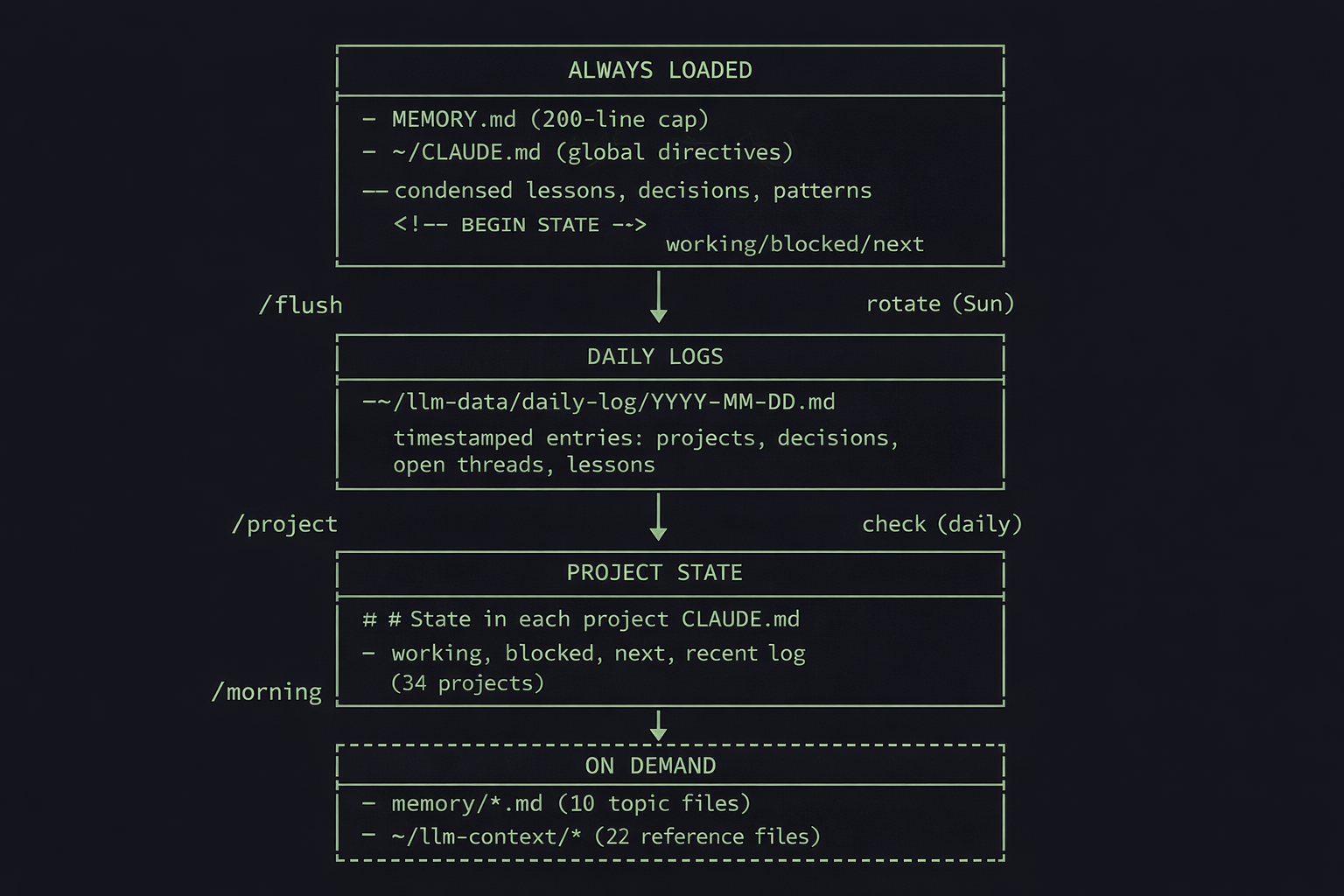
Always Loaded
Two files, injected into every conversation automatically.
MEMORY.md (~130 lines, 200-line hard cap). Condensed one-liner lessons, recent session summaries, architectural decisions, recurring patterns, and a routing table that maps domains to topic files. Claude Code silently truncates everything past line 200. Anything below that line is invisible unless you explicitly read the file. That 200-line cap ended up driving most of the design decisions.
Every lesson is date-stamped. The dates serve two purposes: rotation (old lessons get archived weekly) and pattern detection (a lesson that appears on three different dates is structural, worth promoting to a permanent topic file).
- [pre-2026-02-20] Check for official packages before building custom
- [pre-2026-02-20] Self-correcting daily checks beat manual audits
- [2026-02-22] Always check downstream consumers before deleting files
~/CLAUDE.md (global directives, personality, session lifecycle rules). Also carries a ## State section bracketed by <!-- BEGIN STATE --> markers: what I was working on, what’s blocked, what’s next. When I cd into a project directory, that project’s CLAUDE.md loads too.
Daily Logs
One file per day: ~/llm-data/daily-log/2026-02-22.md. I borrowed this pattern from OpenClaw’s structured logging (my self-hosted AI agent platform).
Each /flush appends a timestamped entry with what was done, decisions made, open threads, and lessons learned. Automated heartbeat alerts from cron write here too.
17:00 - Memory rules operationalization + blog Section 1 draft (~60m)
**Projects:** claude-improvements, llm-scripts, ians-writing
**Done:**
- Created `memory/rules.md` with full 8 design rules
- Built `weekly/check-memory-rules.sh` (8 tests passing)
- Drafted Section 1 of blog article
**Open threads:** Architecture diagram needs revision
**Decisions:** Title locked: "Claude Code Remembers Everything Now"
**Lessons:** Staccato negation lists are the same banned voice pattern
**Stats:** files:7 reads:12 topic:content-writing,rules
Before daily logs, I’d start a session and have to re-explain what we’d been working on. Now Claude reads today’s and yesterday’s logs during /project and picks up every open thread automatically.
Project State
The ## State section embedded in each project’s CLAUDE.md. Working status, blockers, next actions, and an append-only recent log. Updated by /flush at session end, rotated weekly by cron. 34 projects carry their own state independently.
<!-- BEGIN STATE -->
State
Last session: 2026-02-11

Working: Morning TUI stable. Fixed /eod command crash.
Blocked: Canary false positive rate ~100% on .sh files.
Next: Canary overhaul. System alerts condensing.

Recent:
- 2026-02-11: Fixed /eod crash: inline bash syntax collision
- 2026-02-10: Fixed pulse black-screen bug, added [q] quit
- 2026-02-09: Fixed 6 morning TUI bugs
<!-- END STATE -->
While writing this blog post, I was also refactoring the memory system itself, building a compliance cron, and iterating on voice rules. Each project’s State section is small enough that loading it doesn’t eat the context window, but detailed enough that Claude picks up exactly where we left off. I jumped between projects dozens of times over two days without losing a thread.
Because it’s just structured text, you can sync it to your project management tool. I sync mine to Todoist, which means I can glance at any project’s status from my phone without opening a terminal.
┌─ Todoist ──────────────────────────────────────────────────┐
│  PROJECT: ilp-website                                      │
│                                                            │
│  ○  Working: OpenClaw screenshots still needed             │
│  ○  Blocked: Rank Math sitemap cache (on hold)             │
│  ○  Next: Add featured image to WP post                    │
│                                                            │
│  Last sync: 2026-02-22 17:30                               │
└────────────────────────────────────────────────────────────┘
On Demand
Loaded by /project when relevant, based on a domain mapping table.
Topic files (10 files in memory/). Domain-specific lessons: bash-and-system.md, content-writing.md, security.md, apis-and-data.md, rules.md, and five others. Loading ilp-website pulls web-automation.md. Loading claude-improvements pulls bash-and-system.md. This is how the 200-line cap gets managed: instead of cramming everything into MEMORY.md, domain knowledge lives in files that only load when relevant.
Shared context (22 files in ~/llm-context/). Bio, voice guide, platform rules, Todoist structure, weekly rhythms, email signatures, org charts. Stable documents that change rarely. Most of these I haven’t touched in weeks. The voice guide gets loaded almost every writing session. The org chart maybe once a month.
Navigation indexes (6 files in ~/llm-indexes/). Maps of the system: projects.md (34 projects with paths and status), scripts.md (every script with cron schedule), context.md (what each context file does). Teresa Torres uses a similar index-first approach in her Claude Code personal OS setup. These are how Claude finds things without grepping blindly through the filesystem.
Fixing this kind of thing in your own homelab? I send these write-ups by email.
Part 2: Loading and Storing Memory
The user-facing memory system has one reader and one writer. Cron handles automated maintenance separately.
/project loads context. Type /project ilp-website and Claude fuzzy-matches it against the project index, reads the project’s CLAUDE.md and State section, pulls the relevant topic files based on a domain mapping table, checks today’s and yesterday’s daily logs for open threads, and displays a status box:
┌─ Project: ilp-website ───────────────────────────────┐
│                                                      │
│  Path: ~/ilp-website                                 │
│  Status: Active                                      │
│                                                      │
│  Loaded:                                             │
│    [✓] CLAUDE.md                                     │
│    [✓] State section                                 │
│                                                      │
│  Open threads:                                       │
│    - Rank Math sitemap cache needs rebuild           │
│                                                      │
│  Memory: MEMORY.md + web-automation.md               │
└──────────────────────────────────────────────────────┘
Four seconds, and Claude has full context. The fuzzy matching means I type /project ilp or /project claude and it resolves. Subprojects work too: /project openclaw/transcribe loads the parent, then drills into the subproject.
Before this existed, every session started with me re-describing what a project was about while Claude searched the filesystem and dug through old sessions for keywords. That token burn alone made the command worth building.
/flush captures state. Run it once at session end and it handles everything. It appends a timestamped entry to today’s daily log, updates the ## State section in each project’s CLAUDE.md that was touched during the session, and appends new lessons to MEMORY.md. If a domain-specific lesson was learned, it writes to the relevant topic file too.
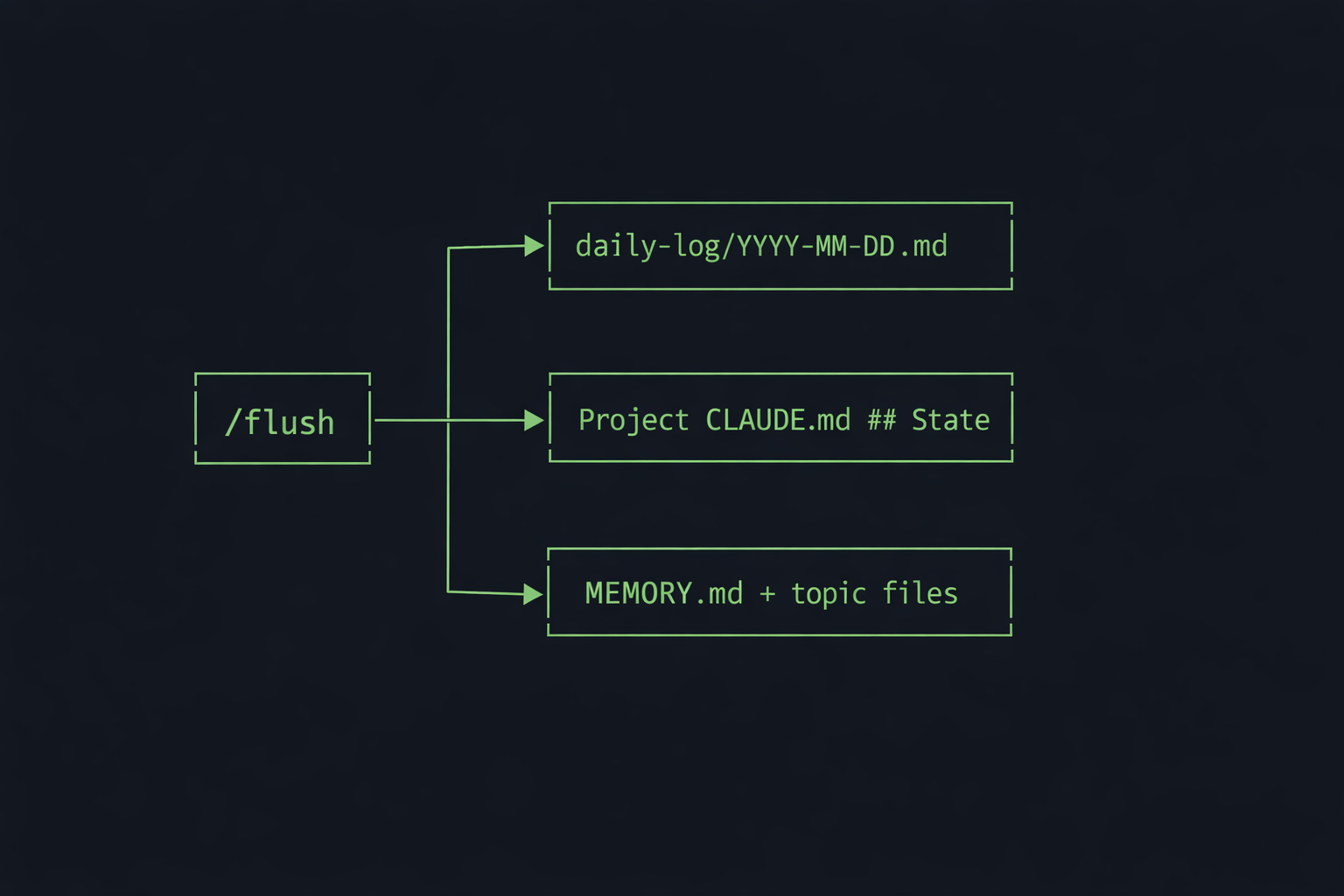
/flush is the only command that writes to the memory system. Every other command (/wp, /seo-research, /morning) interacts with external systems and produces work. /flush is what captures the lessons from that work before the context window resets.
One place enforces all write discipline. The append-only rule, the date-stamp format, the fixed section headers in MEMORY.md, the <!-- BEGIN STATE --> markers. All of it is specified in one 80-line command file.
When the schema drifted (stray headers corrupting MEMORY.md), there was one file to fix.
The first version of /flush was much heavier. It synced to Todoist, wrote verbose entries, pulled in more context. The problem was token cost. If I left it too late in a session, I’d run out of context before the command could finish executing. I trimmed it down to the minimum that captures everything worth keeping.
/project at the start, work, /flush before closing. If context gets heavy mid-session, /flush then /compact "focus on [current task]" to compress without losing state. Everything worth keeping is already persisted to disk.
Part 3: Autonomous Memory Management with Cron
The memory system would rot without automated maintenance. Files drift, indexes go stale, lessons accumulate past the loading cap. Cron jobs catch this before I notice.
Weekly rotation (rotate-memory-lessons.sh, Sundays). MEMORY.md has a 200-line hard cap. Without rotation, lessons pile up until 60% of them are invisible. The rotation script runs claude -p to read all lessons, identify which ones are outdated or already captured in topic files, and archive them to OLD-MEMORY-ENTRIES.md. This one bit me early: I set the budget at $0.50, which was enough for a small file but not for 153KB of accumulated lessons. It failed silently for two Sundays before I noticed. Bumped it to $2.00 and switched from daily to weekly. At that cadence it costs about $8/month on your existing Claude subscription.
Weekly compliance (check-memory-rules.sh, Sundays). Validates the 8 design rules against reality. Is every memory file discoverable via an index? Is every lesson date-stamped? Is MEMORY.md under the 200-line cap? Are the expected section headers present? Six of the eight rules are checked automatically. The other two (canonical location, don’t rebuild built-in features) are human preferences.
Daily consistency (check-consistency.sh). Diffs scripts on disk against the scripts.md index. Checks for orphaned files, phantom index entries, and configuration drift.
State rotation (rotate-state-entries.sh, Sundays). The append-only recent log in each project’s State section grows indefinitely. The rotation script archives entries older than two weeks to OLD-CLAUDE-ENTRIES.md per project, keeping the State section small enough that loading it doesn’t waste context.
Heartbeat (every 6 hours). Borrowed from OpenClaw, where autonomous agents need a way to surface alerts. When I open a session the next morning, /project picks them up automatically. The crontab silently wasn’t loaded for a stretch and nothing alerted me. The fix is wiring in something like Healthchecks.io so you get pinged when a cron job stops firing, not when you happen to notice.
┌─────────────────────────────────┬───────────┬──────────────────────────────┐
│ Script                          │ Schedule  │ What it does                 │
├─────────────────────────────────┼───────────┼──────────────────────────────┤
│ rotate-memory-lessons.sh        │ Sunday    │ Archives old MEMORY.md lines │
│ check-memory-rules.sh           │ Sunday    │ Validates 8 design rules     │
│ rotate-state-entries.sh         │ Sunday    │ Archives old project State   │
│ check-consistency.sh            │ Daily     │ Diffs indexes against disk   │
│ heartbeat.sh                    │ 6 hours   │ Writes overdue P1s to log    │
└─────────────────────────────────┴───────────┴──────────────────────────────┘
Part 4: 8 Rules for Memory Architecture
The system was 22 days old when Anthropic pushed an update to Claude Code’s memory system. Good excuse to audit mine. I ran two parallel audit passes: one focused on structural analysis, the other on semantic review. They found 5 critical issues and 8 important ones.
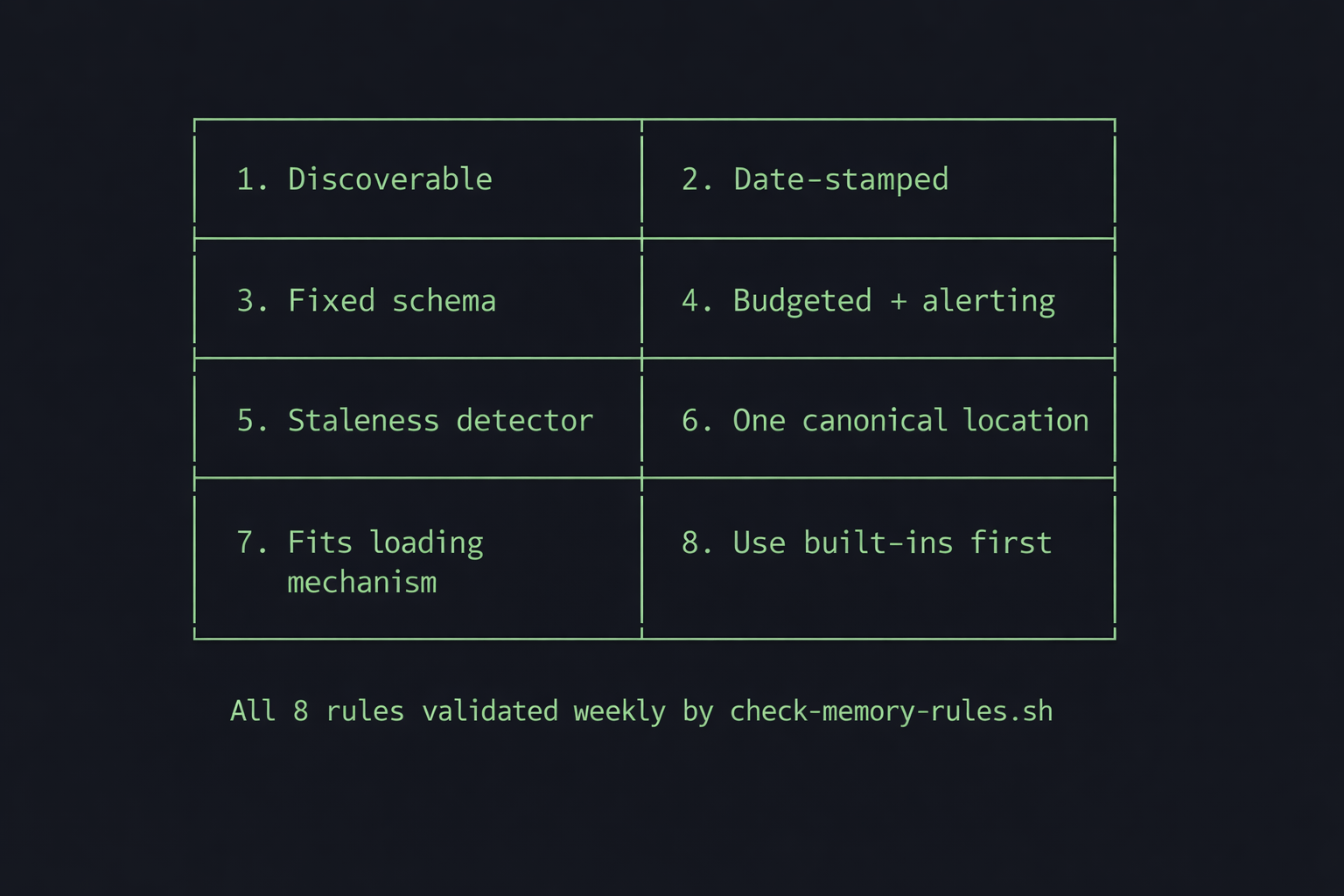
Every bug mapped to a structural pattern. I turned them into 8 rules. These now live in memory/rules.md and get validated weekly by cron.
1. Every file must be discoverable via an index or mapping. Three files had silently orphaned themselves. system-overview.md was the worst. I’d written it as a roadmap for Claude, but no command ever loaded it. Over time it became documentation for me, not the system. credentials-inventory.md wasn’t in the /project loading table. A project row in projects.md had landed below the table’s closing section, invisible to anything parsing the table format. This led directly to the orphan detection script: if a file isn’t referenced by a command, an index, or a mapping table, it doesn’t exist to the system.
2. Every lesson must be date-stamped. Format: [YYYY-MM-DD] lesson text. Without dates, you can’t rotate by recency. You also can’t detect repeat patterns. A lesson that shows up on three different dates is structural and worth promoting to a permanent topic file. A lesson that shows up once might be situational.
3. Every write target must have a fixed schema. MEMORY.md has six locked section headers. /flush is forbidden from creating new ones. This rule exists because /flush did create stray headers, which pushed content below the 200-line cap. Invisible lessons, caused by a schema violation in the sole writer.
4. Every cron job must be budgeted and alert on failure. The rotation cron silently failed for two consecutive days. The budget was too low for the volume of file reads. No alert fired. I didn’t notice until a manual audit.
5. Every index must have a staleness detector. scripts.md drifted by 12 entries. system-overview.md listed 4 of 11 commands. I noticed when Claude started rebuilding scripts that already existed. It was reading the index, seeing a gap, and helpfully writing a new version of something I’d built two weeks ago. I had to tell it to stop trusting the index and go look at what was actually on disk. Nothing was comparing reality against what the indexes claimed. The fix: check-consistency.sh now diffs every index automatically.
6. Every fact lives in exactly one canonical location. MEMORY.md had a ## Project State section that duplicated per-project CLAUDE.md State sections. Both were being updated, and the data diverged. A separate lessons-learned.md index duplicated the MEMORY.md topic table. A system-overview.md duplicated info the filesystem already describes. The fix was always the same: delete the copy, keep the canonical source.
7. Every file must fit its loading mechanism. MEMORY.md at 501 lines with a 200-line auto-load cap meant 60% of lessons were invisible. The append-only discipline is good for durability but guarantees overflow without rotation. The loading constraint is a hard boundary that makes everything beyond it disappear.
8. Don’t rebuild what Claude Code provides natively. I built a lessons-learned.md index before discovering that MEMORY.md’s topic table already did the same thing. I discovered the official Todoist MCP six days after it shipped because I’d built a custom integration. Check what’s built-in before building custom.
How It’s Working Across 34 Projects
Twenty-two days in, across 34 projects, the parts worth reporting are the ones the setup didn’t predict: what it costs, how small it stays, and how long it took to get there.
Cost is negligible. A $6/month VPS, SyncThing (free), and cron jobs running on my existing Claude subscription. The weekly rotation and compliance checks add zero marginal cost in CLI mode (API users would pay for rotation tokens).
It’s 50 files. 10 topic files, 6 indexes, 22 context files, 2 command files, a handful of cron scripts. All plain markdown except the scripts. The entire system fits in a single tree output. It’s just text files in directories.
The path here wasn’t obvious. Early versions whipsawed between two failure modes: loading so much context that 60% of the window was consumed before I started working, or loading too little and having things forgotten between sessions. The first few iterations required constant manual tuning, deciding what to load, when to rotate, what to keep. Claude’s built-in memory system still assumes some of that manual curation. This system is designed to be fully autonomous and scalable. It took three weeks of trial and error to get there.
What I Got Wrong
MEMORY.md grew to 501 lines before I noticed Claude was clipping it at 200. Sixty percent of my lessons were invisible for days. A line-count check after every /flush would have caught it immediately. The compliance cron and consistency checks I built in week three should have been in week one.
The append-only discipline is correct for durability, but every append-only file eventually overflows its container. I added rotation three weeks in, after the overflow had already caused problems. Building the rotation cron the same day I created the file would have avoided that.
/flush is an 80-line prompt template. It took exactly one missing instruction (“never create new section headers”) to corrupt MEMORY.md’s structure. Having a single writer is correct, but the writer’s spec needs to be tight, explicit about what’s allowed and what’s forbidden, the way a database migration is.
For three weeks, the rotation scripts archived old entries into OLD-MEMORY-ENTRIES.md and OLD-CLAUDE-ENTRIES.md, and nothing ever read them back. Now the rotation generates short summaries at the bottom of the active files with pointers to the full archives. The active file stays small, but the system can still reference older context when something resurfaces.
Why Plain Markdown
This runs on plain markdown files, synced across machines with Syncthing. Claude Code reads them natively, so there’s nothing to install and nothing to maintain. I can browse and edit everything in Obsidian, and there’s zero infrastructure between the LLM and its memory.
When MEMORY.md bloated past its 200-line loading cap and 60% of my lessons went invisible, I opened the file in Obsidian, saw the problem immediately, and fixed it in ten minutes.
The flip side of maintaining that vault is periodic bulk cleanup; a Docker-sandboxed local-LLM pipeline recently sorted 2,300 files in my home directory without touching the cloud.
- Syncs anywhere. SyncThing keeps everything in sync across my VPS, laptops, and on-premise compute nodes (I wrote about that setup separately). Rsync and git work too. Every sync tool on earth handles text files.
- Zero local overhead. This runs on a $6/month DigitalOcean droplet (the same box that later locked me out during an OOM event). Other approaches like QMD download 2GB of GGUF models and run them locally to search your files. QMD gives you local semantic search, which matters for large corpora. For a system with 10 topic files and a routing table, I prefer the leaner environment.
- Human-readable diffs. When a cron job corrupts a file,
git diffshows exactly what changed. - Failure modes you can diagnose. Markdown doesn’t have schema migrations, version conflicts, or index corruption. The memory directory is a git repo, so when something breaks (and it will, see Part 4),
git diffshows exactly what changed.
The tradeoff is semantic search. A January 2026 LlamaIndex benchmark found that filesystem-based retrieval scored higher on correctness (8.4 vs 6.4) and relevance (9.6 vs 8.0) than vector RAG when tested on 5 papers. At 100+ documents, RAG pulled ahead on both speed and correctness.
That benchmark used academic papers rather than one-liner lessons, but a personal memory system with 10 topic files and 22 days of logs sits firmly in the small-corpus range where filesystem retrieval is competitive. Claude Code reads the topic file headers and routes to the right domain automatically. In 22 days, I’ve never needed to search for a lesson I couldn’t find through the routing table.
If you build something similar, start with the 8 rules above.
The inference node behind this work is a Dell Precision T5820 with an RTX 3090 Ti serving Qwen3.6-27B at 39 to 49 tok/s with MTP speculative decoding (build notes here).
The model selection behind this work is covered in my 38-task LLM benchmark; the LLM picker tool distills the same data into per-task recommendations.
About the Author
Ian Paterson is a technology executive and builder based in Victoria, BC. He runs a publicly traded cybersecurity company and manages 34 active projects across corporate strategy, AI infrastructure, and content using Claude Code as his daily operating system. This is the second in a series documenting that infrastructure. The first covered OpenClaw, his self-hosted AI agent platform.
Hit an error? See the LM Studio troubleshooting guide for fixes.
The same infrastructure approach applies to tracking API quotas across Claude, Codex, and Gemini, where an hourly cron normalizes usage data from three different sources into one JSON file.
FAQ
How large can MEMORY.md be before Claude Code stops reading it?
Claude Code silently truncates MEMORY.md past line 200, so anything below that line is invisible unless you explicitly open the file. Ian’s copy grew to 501 lines before he noticed 60% of his lessons were being clipped. Keep it under a 200-line hard cap and rotate the overflow into an archive file.
How much does a markdown memory system for Claude Code cost to run?
Almost nothing: a $6/month DigitalOcean VPS, SyncThing (free), and cron jobs on an existing Claude subscription. The weekly rotation and compliance checks add zero marginal cost in CLI mode; API users pay only for the rotation tokens, roughly $8/month at the weekly cadence.
Is filesystem memory better than vector search for an LLM?
For a small corpus it holds up. A January 2026 LlamaIndex benchmark scored filesystem retrieval higher than vector RAG on both correctness (8.4 vs 6.4) and relevance (9.6 vs 8.0) across 5 papers, but RAG pulled ahead past about 100 documents. A 10-topic-file memory sits firmly in the small-corpus range where filesystem routing wins.
What keeps the memory system from rotting over time?
Five cron jobs: rotate-memory-lessons.sh (Sunday, archives old MEMORY.md lines), check-memory-rules.sh (Sunday, validates the 8 design rules), rotate-state-entries.sh (Sunday, archives old project State), check-consistency.sh (daily, diffs indexes against disk), and heartbeat.sh (every 6 hours, writes overdue P1 tasks to the log).
What is allowed to write to the memory system?
Only /flush writes; /project reads. Concentrating all write discipline (the append-only rule, the date-stamp format, the six locked MEMORY.md section headers) in one roughly 80-line command file meant that when the schema drifted and stray headers corrupted the file, there was exactly one place to fix it.
How a CEO uses Claude Code and Hermes to do the knowledge work
A blank or generic config file means every session re-explains your workflow. These are the files I run daily as CEO of a cybersecurity company managing autonomous agents, cron jobs, and publishing pipelines.
- CLAUDE.md template with session lifecycle, subagent strategy, and cost controls
- 8 slash commands from my actual workflow (flush, project, morning, eod, and more)
- Token cost calculator: find out what each session is actually costing you
One email when the pack ships. Occasional posts after that. Unsubscribe anytime.